Desk streaming setups at $67, $366, and $570: what each tier changes
By Elan Harpaz · Published 2026-07-15 · Updated 2026-08-06
Three complete desk builds priced from the catalog. Only one part in the whole range changes the stream quality verdict, and it costs $18.
Your encoder tops out at 1080p60. A higher-end encoder would go further.
Buy links are affiliate links: we earn a commission at no extra cost to you. Prices are tracked estimates, not live prices. Full disclosure
| Component | Pick | Price | |
|---|---|---|---|
| Camera | Elgato Facecam MK.2 Premium Full HD face cam built for streaming, with a true 1080p60 sensor. Buy on Amazon | $119.99 | Buy on Amazon |
| Audio | FIFINE USB/XLR Dynamic Hugely popular budget dynamic that rejects room noise and keyboard clatter. Buy on Amazon | $56.99 | Buy on Amazon |
| Mic Arm | Elgato Wave Mic Arm LP Low-profile boom arm that stays below the frame and routes cables internally. Buy on Amazon | $99.99 | Buy on Amazon |
| Lighting | NEEWER 18in Ring Light Even, flattering key light with a stand and adjustable color temperature. Buy on Amazon | $71.99 | Buy on Amazon |
| Control Deck | Elgato Stream Deck Mini Six keys for the essentials at a lower price and footprint. Buy on Amazon | $51.99 | Buy on Amazon |
| Software | OBS Studio Free, open-source broadcast software. On a PC it is also your encoder, up to 4K with a decent GPU. Learn more | Free | Learn more |
Budget guides usually pick a round number and work backwards to fill it. This one runs the other way: here are three real parts lists, priced from the catalog, and an honest account of what each step up actually changes. The parts list and the verdict on this page are the middle build.
| Starter | This build | Step up | |
|---|---|---|---|
| Camera | NexiGo N60, $22 | Elgato Facecam MK.2, $95 | Logitech MX Brio 4K, $161 |
| Microphone | FIFINE USB/XLR, $45 | FIFINE USB/XLR, $45 | Shure MV7, $249 |
| Mic arm | None | Elgato Wave Arm LP, $66 | None |
| Light | A window or a lamp, $0 | NEEWER 18in ring, $80 | NEEWER 18in ring, $80 |
| Control | OBS hotkeys, $0 | Stream Deck Mini, $80 | Stream Deck Mini, $80 |
| Software | OBS, free | OBS, free | OBS, free |
| Hardware total | $67 | $366 | $570 |
| Holds on Twitch | 1080p30 | 1080p60 | 1080p60 |
The one $18 upgrade that changes the verdict
Read the bottom two rows together. The starter build holds 1080p30 and the other two hold 1080p60, and the entire reason is that the $22 NexiGo webcam caps at 30 frames per second. Clear that one spec, which the $40 EMEET NOVA 4K does for $18 more, and the verdict moves. Nothing else across the $503 between the cheapest and the dearest build touches the tier, because of The Twitch 6000 Ceiling: standard Twitch ingest tops out around 6,000 kbps, 1080p60 is what that carries, and no amount of camera gets you past it.
That is not an argument for buying the $67 build. It is an argument for knowing what you are buying. Above the frame-rate floor you are paying for how the stream reads to a person, not for what the engine can promise: a mic that rejects your keyboard, a light so your face is not a grey smear, an arm that gets the mic close enough for the mic to work.
What each step up actually buys
- $67 to $366: a boom arm and a light. The arm gets the FIFINE within a fist of your mouth, which is the condition under which a dynamic mic rejects a room at all. The ring light is the difference between a viewer seeing your expression and not.
- $366 to $570: a better microphone, and a 4K sensor downscaled to the 1080 the platform delivers. The MV7 at $249 is a genuine step in what people hear. Both are quality-of-image and quality-of-voice, not quality-of-stream.
- Past $570: an audio interface, a capture card, a green screen. Every one of them adds a box to the chain, and none of them is a first-year purchase.

In all three builds on purpose. At $45 tracked it is the cheapest part here that changes what a viewer experiences, and a dynamic capsule is the right answer in a room with no acoustic treatment.

A native 1080p60 sensor at $95 tracked with nothing to downscale, in a build the platform caps at 1080p60 anyway.
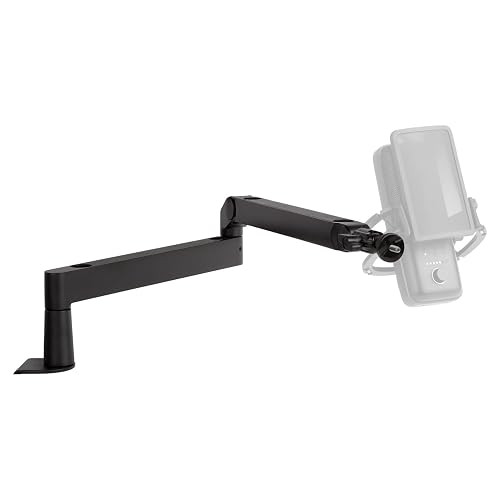
The $66 that makes the $45 mic work. Low profile so it stays out of frame, with the cable routed inside.
Named alternatives that lost
- Blue Yeti X at $170. It is the mic people picture when they picture streaming, and it is a condenser: it hears the room, the fan, the keyboard, and your housemate. In an untreated bedroom the $45 dynamic sounds more professional, which is an uncomfortable sentence to write about a $170 mic.
- Elgato Key Light Air at $100 over the NEEWER ring at $80. The Elgato is the better light and it is app-controlled, and at this budget the $20 goes to the mic arm instead. Buy the key light when the light is the last weak thing left.
- Stream Deck MK.2 at $108 over the Mini at $80. Fifteen keys beat six and cost less per key, and on a starter desk the six get you scene, mute, BRB, clip and two spares. This is the one place in the table where I would not fight you for spending $28 more.
Frequently asked
Can you start streaming on Twitch for under $200?
Comfortably. At tracked prices a NexiGo N60 webcam, a FIFINE USB dynamic mic, a window or a desk lamp, and OBS come to about $67. The engine plans that build at 1080p30, and the only thing standing between it and 1080p60 is the webcam’s 30 fps cap.
What should you buy first for a streaming setup?
The microphone, then a light, then the camera. A mic and a light are the two parts that change how the stream reads to a viewer; the camera only changes the verdict at the very bottom of the range, where a 30 fps webcam caps the build at 1080p30.
Do you need a Stream Deck to stream?
No. Every function on one is an OBS hotkey that costs nothing. A deck is worth buying when you are switching scenes often enough that hunting for a key combination mid-stream is the thing going wrong, which is usually well after your first month.
What stream quality does this 1080p desk build hold?
This 1080p desk build holds 1080p60 on Twitch (standard), planned against a budget of about 4,200 kbps with the stream itself sitting near 4,200 kbps on the wire. That is a conservative planning figure with headroom built in, not a peak, so it is what the build should hold on an ordinary day rather than its best ever result.
How much upload speed does this 1080p desk build need?
About 6.0 Mbps of sustained upload to run 1080p60 comfortably. That is the 4,200 kbps this build actually puts on the wire plus the headroom that stops a bitrate spike or a moment of packet loss from turning into a buffer. Planning at exactly the stream bitrate is how streams end up stuttering on connections that look fine on a speed test.
How much does this 1080p desk build cost?
$400.95 in hardware as specified here, with no recurring cost. Prices are tracked estimates rather than a live feed, so treat them as a planning number and check the retailer page before buying.
What is the bottleneck in this build?
What stops this build going a tier higher is the encoder. It tops out before the connection does, so a more capable encoder is the upgrade that matters. Naming the actual limit matters because the expensive upgrade people reach for first is usually not it.
About this guide. Written by Elan Harpaz. We do not lab-test hardware. Every quality verdict on this page is a planning budget computed from a published model, and every price is a tracked estimate rather than a live one. How the numbers are derived: methodology. How picks are chosen: editorial policy.
Build on this in the configurator